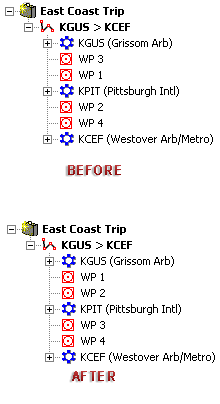
Route Waypoints that are not associated with airports or navaid elements are automatically assigned the name WP 1, WP 2, and so on, in the order that they are created. The program will not automatically arrange the waypoints in numerical order if the waypoints are deleted or created in a manner in which the waypoints are not in order.
If you would like to arrange the waypoints in numerical order, right-click the route in the RoutePack List and choose Renumber Route Waypoints.
If you assigned the waypoint a new name (right-click on the waypoint, and click Properties), it will not be overwritten in the process of renumbering the route waypoints.