Garmin System ID
The system ID is used for updates to your Garmin panel-mounted device. The G1000 family, G500 family, GTN family, and G3X all use system ID for database updates. Garmin portable devices use a similar identification, called an unit ID. The unit ID is an internal number which is required for database updates and downloads. Visit the Garmin website to determine how to find the system ID on panel mounted avionics and the unit ID on portables.
Customers who wish to use their Garmin system ID in JDM need to contact Jeppesen customer support to add system IDs to their Jeppesen account.
JDM pulls the system ID from Oracle and displays it for each applicable service in JDM. Hover your cursor over the system ID box, and it displays the system ID stored with that avionics.

Once a system ID or unit ID is associated with a Garmin service, counters no longer apply in JDM. You can download and transfer these Garmin services as many times as you wish. Counter resets are no longer necessary.
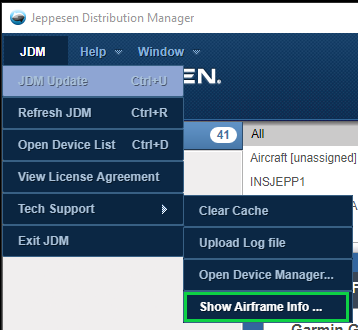
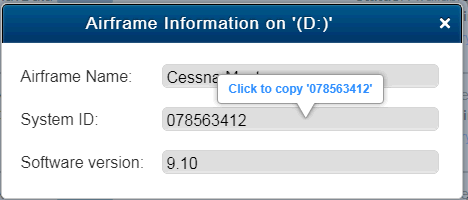
If you don't know your Garmin system ID, JDM can help you find it. While you are engaged with Jeppesen support staff, you can easily access your system ID and provide it to them. Make sure your SD card is inserted in your computer. You must have used the SD card at least once to upload data into the Garmin avionics. A new or reformatted SD card does not have the system ID information available. Go to the JDM menu in the upper left corner and click on Tech Support. From the Tech Support menu, select Show Airframe Info. The pop-up displays the airframe name, Garmin system ID and avionics software version.
Hover over the system ID value. Click on the blue text "Click to copy" to copy the system ID to the clipboard. Paste the system ID into email or a chat window with CTRL+V to avoid typos. If you have more than one SD card inserted in your computer, a selection window asks you to select the correct SD card.
With the JDM 3.8 release, JDM can apply a Garmin system ID to a service. If system ID does not exist in your Jeppesen account but can be derived from your SD card, JDM pulls the value and presents it to you to apply. The SD card must have been used to upload data to the avionics at least once before JDM can pull the system ID from it. Insert your SD card, and click Transfer to Media. Use the airframe information in the dialog to ensure you are applying the correct system ID to the correct service. When you choose Apply, the system ID is saved in JDM. Once the transfer is complete, the system ID value is applied to the service and counters are turned off. A system ID on a service means unlimited transfers each cycle.
If you choose Not Now, the transfer continues using counters.
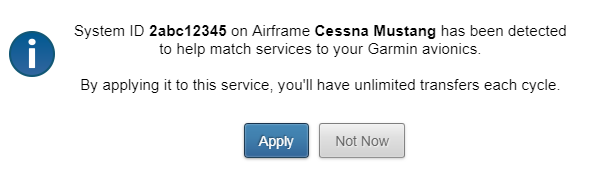
You are prompted to apply the system ID for each Garmin service listed for that aircraft in JDM.
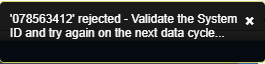
JDM has business rules that check for a system ID value that may not apply to the avionics you have selected. If you attempt to apply a system ID for a G1000 service to a GTN service, for example, JDM issues a warning and asks you to verify that you are using the correct card for the service selected. If a warning is issued, JDM continues to transfer the data to the media using counters.
If you have several aircraft in your account that utilize the same Garmin avionics unit (ie a G1000) and coverage (ie Worldwide), JDM 3.11 and newer will automatically include all the System ID's of those units in the active account (up to 200). This allows one media to load data secured with System ID to each aircraft without needing to load new data from JDM each time. If such a transfer occurs, a notice will appear in JDM's top-right corner indicating how many System ID's were written, which will correlate to the number of avionics units the media can upload into.
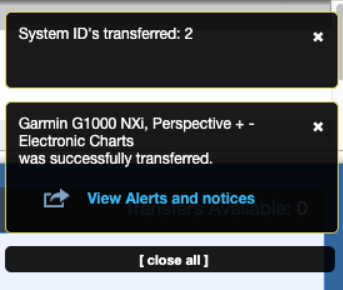
To verify which System ID's have been written to the media, you can check the ".jdm" file on your media. NOTE that you will need to enable seeing hidden files on your media in order to see ".jdm." Once opened, you can search for "gsi" which is short for "Garmin System ID."