Menus and Toolbars
Menus
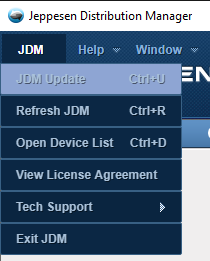
Under the JDM menu, you will find application updates (if available), device list, license agreements, and technical support. Use the Tech.Support > Upload Log File option if you experience any issues with the application. The log file will be uploaded to Jeppesen servers for retrieval by technical support personnel. You can also clear all JDM-related data from your computer by selecting the option Tech. Support > Clear Cache. This option should only be used when working with someone from the technical support team to troubleshoot issues on your computer.
The Help menu provides information about this version and the ability to view the help file and the quick start guide.
The Window menu allows you to zoom in and out and reset.
Toolbars

The Toolbar Area is located in the upper right corner of the Jeppesen Distribution Manager window. Hover your mouse over each symbol to view the name. This area also displays your user name and customer number for reference. The buttons include from left to right:
Quick Links - External internet links that pertain to your services, like Modified Data Report, Update Schedules, and Alert & Notices. New links provide easy access to Jeppesen Technical Support resources.
Preferences - Allows customization of information presented in the Jeppesen Distribution Manager application. You can show network diagnostics at log in, display the Quick Start Guide, prompt for confirmation at log out, show runway length filter and exception airports, and display additional notification messages.
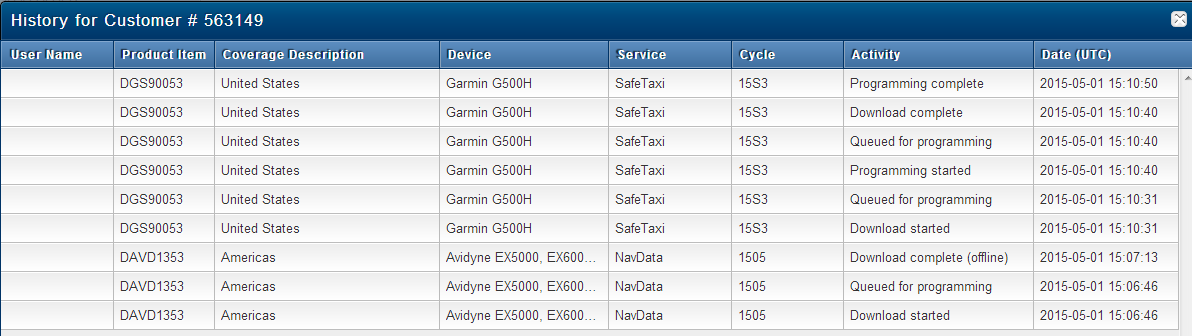
History - View all Jeppesen Distribution Manager activity on your account, as shown in the screen shot below.
Alerts - Alerts provide you with up to date information on your services and the JDM application.
Help - View help documentation for Jeppesen Distribution Manager.
Search - Use the search box to find an aircraft by tail number, make, or model. You will need to enter at least two characters in the field before it will display any results.

This toolbar is located in the bottom right corner of the JDM application.
Network connection status - Indicates if you are connected to the internet. If you lose connection to the internet or Jeppesen servers, the symbol turns red.