| NOTE | With the release of Jeppesen live weather in version
9.5, you must update both FliteStar and FliteDeck for shared features
to work. Contact Jeppesen Customer
Service or go to www.JeppDirect.com to purchase an updates.
Part of this update is a new Jeppesen Weather Controller service, which eliminates the issue described below. |
If you have FliteDeck installed with the XM WxWorx weather, the FliteStar Profile view may no longer display winds aloft, clouds and other weather information.
To restore the FliteStar weather display:
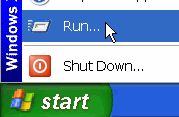
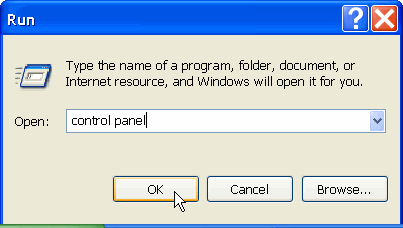
Go to Start> Run, type in "control panel", and click OK.
When the Control Panel dialog opens, double-click Administrative Tools, and then Services.
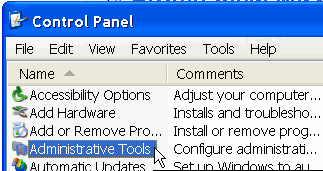
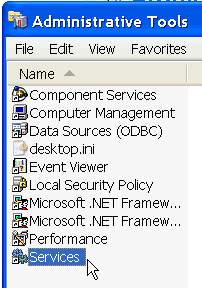
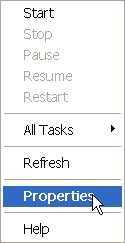
In the Services dialog, locate the Jeppesen Weather Controller Service, and right click on the name.

In the dialog that appears, select Properties.
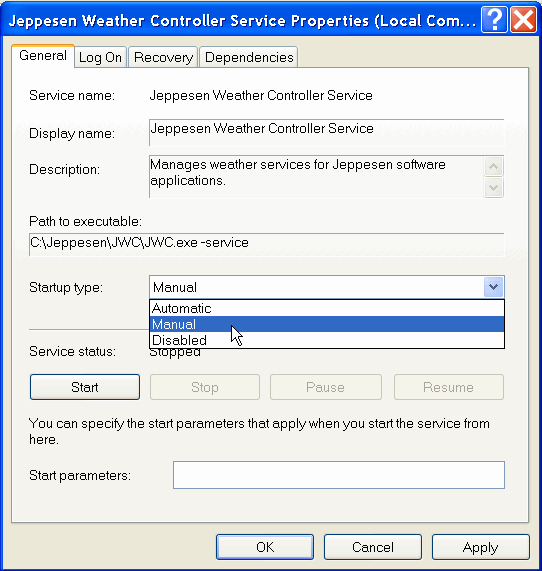
In the Properties dialog General tab, change "Startup type" to Manual, and click OK.
Reboot your computer. Weather information from the text briefings should now appear in the Profile view.
When you run FliteDeck after this, a message will appear asking if you want to open the Jeppesen Weather Controller. Accept the message to view WXWorx data in FliteDeck.